



Google Maps introduces ‘Ask Maps’, a Gemini-powered feature that answers questions about places
Google has introduced Ask Maps, a new Gemini-powered AI feature in Google Maps that allows users to ask conversational questions about places, travel options and nearby recommendations.
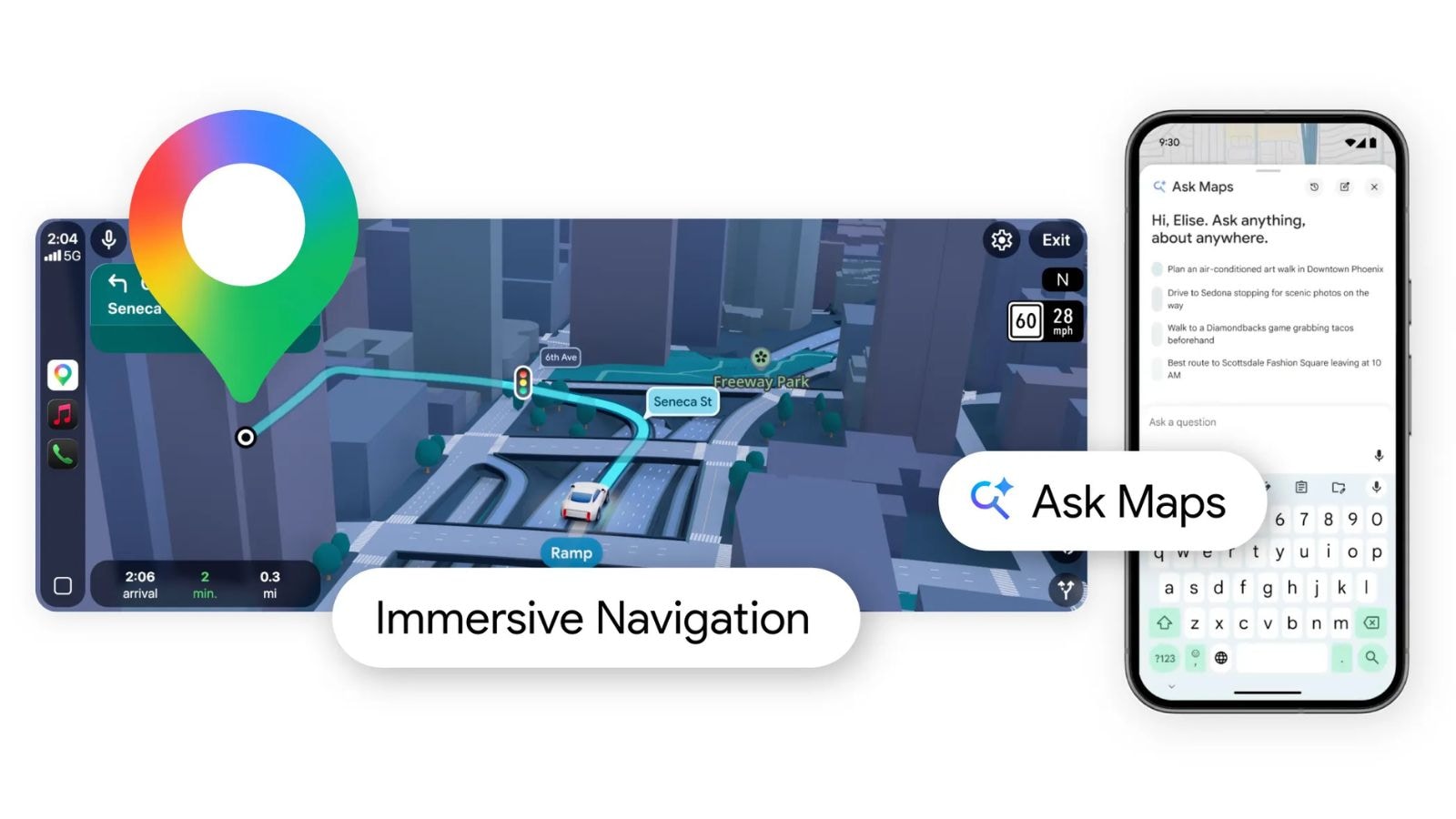
One of the most widely used mapping platforms, Google Maps now lets users ask it almost any question about any place. Google, on Thursday, March 12, introduced a new artificial intelligence-powered conversational experience in Google Maps, powered by Gemini. The new feature, named Ask Maps, answers complex real-world questions about any place.
Ask Maps is rolling out in the US and India in English on Android and iOS. The feature is expected to launch soon in Hindi.
Google says that the new feature is uniquely helpful, as it taps into Maps’ fresh information about the world to show everything a user needs to know. It personalises responses and makes it easier for users to plan their trips. To make these insights possible, Maps analyses information from over 300 million places, along with reviews from its global community comprising over 500 million contributors.
Using the feature is fairly simple; users need to tap on the ‘Ask Maps’ button to ask questions using either voice or text. Google says that the feature will offer clear directions, along with a comparison of driving and public transport based on traffic conditions and ETA. Moreover, it will also show cafes in the vicinity.
Earlier, finding a spot to meet friends would mean numerous back-and-forth conversations and hours of web searches to pick the right spot. But with Ask Maps, planning a night out for a big game is easier.
Just ask, “What are some places with good veg appetisers where I can watch the live streaming of today’s match?” Users can also follow up with, “Which of these would be easiest to park in?” Based on the questions, Ask Maps will highlight important insights and tips from real people and web content, such as the most popular vegetarian appetisers, matchday environment, valet parking availability, and more.
Ask Maps can assist users across a range of complex planning and information needs. For example, if you have family coming over and want to plan the perfect weekend, you can ask: “My parents, who are senior citizens, are coming to visit Mumbai for the first time this weekend. What places or experiences can I take them to that they can cover easily?”
In response, Ask Maps will offer thoughtful recommendations that take a user’s specific requirements into consideration, such as suggesting locations with minimal walking or senior-priority access.
One of the key highlights of Ask Maps is that it personalises responses based on things like places a user has searched for or saved in Maps to help them get the most relevant information. If you are visiting Bengaluru, you can ask, “Suggest some highly rated restaurants to try in the area.” The feature already knows your preference for vegetarian cuisine and will suggest vegetarian options. Besides, the feature can help you book restaurant reservations, save places to a list, or get directions and start navigating.
One of the most widely used mapping platforms, Google Maps now lets users ask it almost any question about any place. Google, on Thursday, March 12, introduced a new artificial intelligence-powered conversational experience in Google Maps, powered by Gemini. The new feature, named Ask Maps, answers complex real-world questions about any place.
Ask Maps is rolling out in the US and India in English on Android and iOS. The feature is expected to launch soon in Hindi.
Google says that the new feature is uniquely helpful, as it taps into Maps’ fresh information about the world to show everything a user needs to know. It personalises responses and makes it easier for users to plan their trips. To make these insights possible, Maps analyses information from over 300 million places, along with reviews from its global community comprising over 500 million contributors.
Using the feature is fairly simple; users need to tap on the ‘Ask Maps’ button to ask questions using either voice or text. Google says that the feature will offer clear directions, along with a comparison of driving and public transport based on traffic conditions and ETA. Moreover, it will also show cafes in the vicinity.
Earlier, finding a spot to meet friends would mean numerous back-and-forth conversations and hours of web searches to pick the right spot. But with Ask Maps, planning a night out for a big game is easier.
Just ask, “What are some places with good veg appetisers where I can watch the live streaming of today’s match?” Users can also follow up with, “Which of these would be easiest to park in?” Based on the questions, Ask Maps will highlight important insights and tips from real people and web content, such as the most popular vegetarian appetisers, matchday environment, valet parking availability, and more.
Ask Maps can assist users across a range of complex planning and information needs. For example, if you have family coming over and want to plan the perfect weekend, you can ask: “My parents, who are senior citizens, are coming to visit Mumbai for the first time this weekend. What places or experiences can I take them to that they can cover easily?”
In response, Ask Maps will offer thoughtful recommendations that take a user’s specific requirements into consideration, such as suggesting locations with minimal walking or senior-priority access.
One of the key highlights of Ask Maps is that it personalises responses based on things like places a user has searched for or saved in Maps to help them get the most relevant information. If you are visiting Bengaluru, you can ask, “Suggest some highly rated restaurants to try in the area.” The feature already knows your preference for vegetarian cuisine and will suggest vegetarian options. Besides, the feature can help you book restaurant reservations, save places to a list, or get directions and start navigating.